
Website widget
Customise a widget
Change the launcher's look and the chat's wording to match your site.
On your widget's card, open the customise panel (the card's first button — it reads Close while the panel is open). Changes apply to every page the widget is on — you don't need to change the snippet. A preview shows the launcher as you edit, and Reset puts everything back to the defaults.
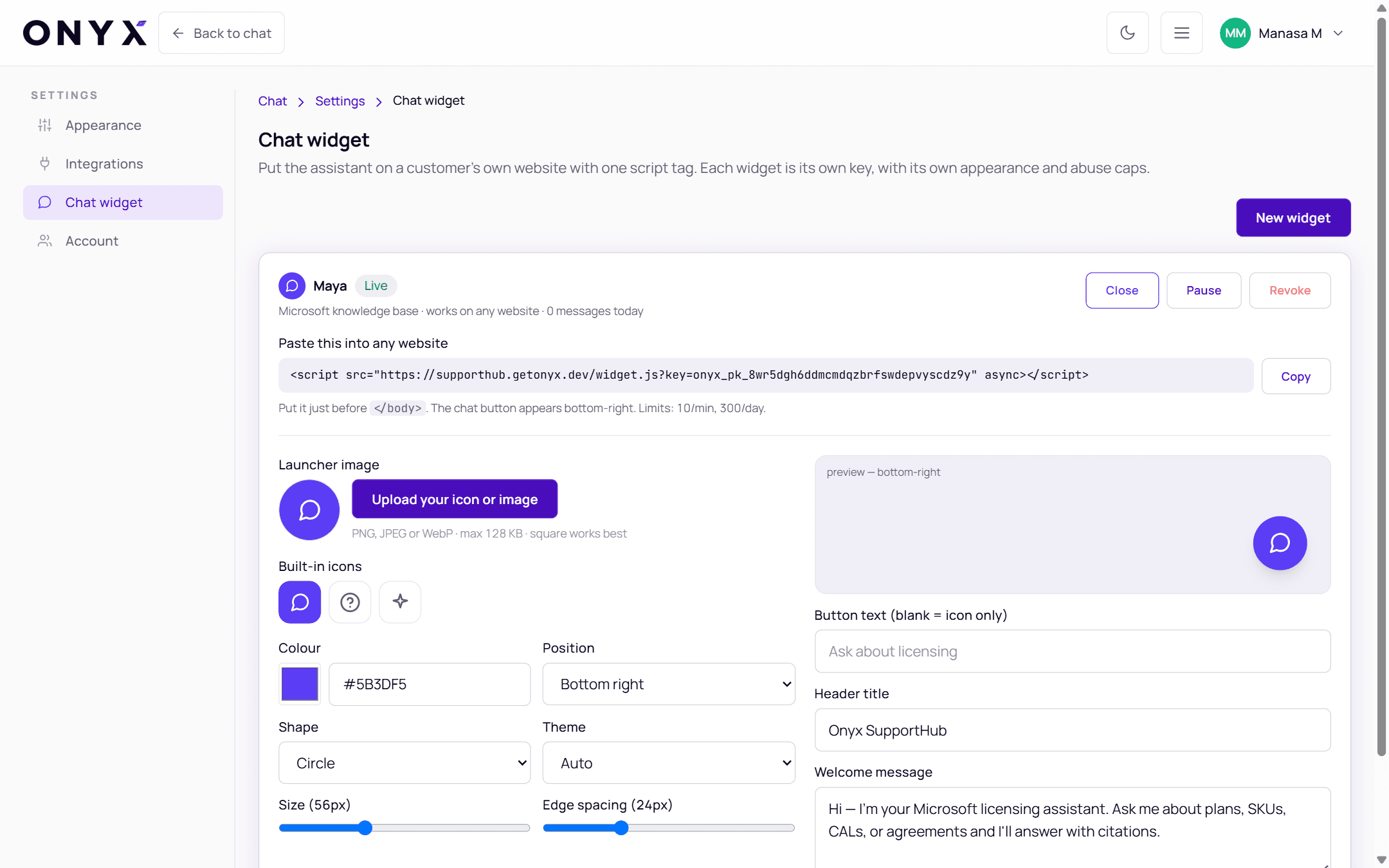
Launcher
| Setting | Options |
|---|---|
| Launcher image | Upload your own icon (PNG, JPEG or WebP · max 128 KB · square works best), or pick one of the Built-in icons |
| Colour | Any colour — the default is Onyx violet |
| Position | Bottom right or Bottom left |
| Shape | Circle or Rounded square |
| Size | 36–96 px (default 56) |
| Edge spacing | Distance from the edge of the screen, 0–200 px (default 24) |
| Button text (blank = icon only) | A short label beside the icon, such as "Ask about licensing" — up to 40 characters |
Chat window
| Setting | Default |
|---|---|
| Theme | Auto (follows the visitor's device), Light or Dark |
| Header title | Onyx SupportHub |
| Welcome message | Hi — I'm your Microsoft licensing assistant. Ask me about plans, SKUs, CALs, or agreements and I'll answer with citations. |
Per-page changes
To change the look on one page only, add attributes to the snippet on that page:
<script
  src="https://supporthub.getonyx.dev/widget.js?key=onyx_pk_…"
  data-onyx-position="bottom-left"
  data-onyx-theme="dark"
  data-onyx-accent="#602AFF"
  data-onyx-label="Licensing help"
  data-onyx-offset="32"
  async
></script>| Attribute | Values |
|---|---|
data-onyx-position | bottom-right or bottom-left |
data-onyx-theme | auto, light or dark |
data-onyx-accent | A hex colour such as #602AFF |
data-onyx-label | Text beside the launcher |
data-onyx-offset | Distance from the edges, in pixels |
Open the widget from your own button
Your page can control the widget with JavaScript — for example from a "Chat with us" link:
<a href="#" onclick="window.OnyxWidget.open(); return false;">Ask our licensing assistant</a>| Call | Does |
|---|---|
window.OnyxWidget.open() | Opens the chat |
window.OnyxWidget.close() | Closes it |
window.OnyxWidget.toggle() | Opens or closes |
window.OnyxWidget.expand() | Maximises the chat window |
window.OnyxWidget.collapse() | Restores its normal size |