
What visitors see
How the widget looks and behaves for the people on your website.
Opening the chat
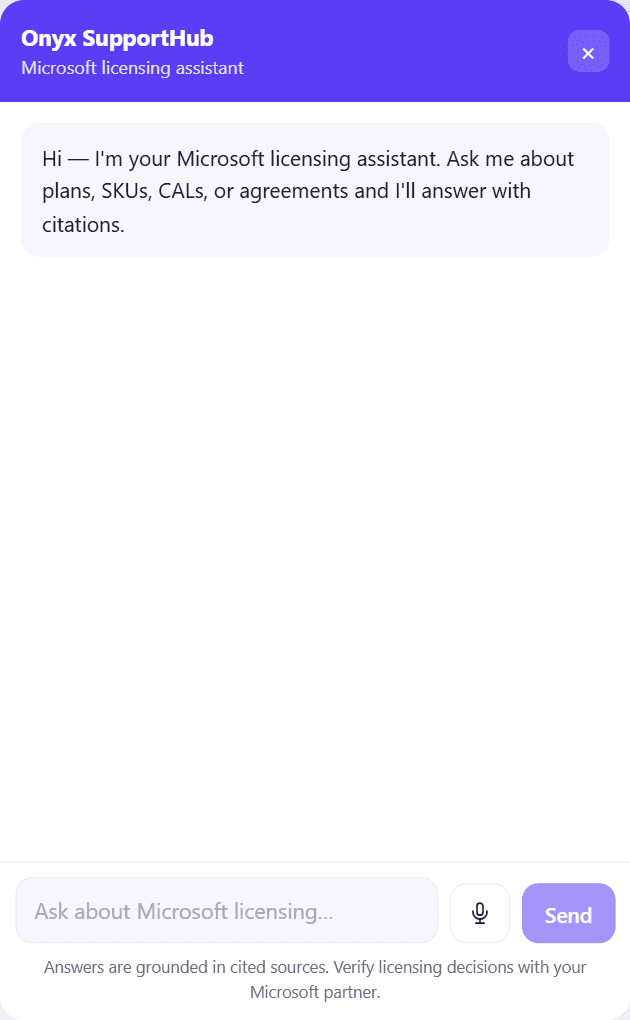
Visitors see your launcher in the corner of the page. Clicking it opens a chat window with your header title and welcome message. The chat loads only when first opened, so it doesn't slow your page down.
In the window's header they can Maximize chat / Restore chat to its normal size, or Minimize chat. Esc closes it.
Asking questions
Visitors type in the box and press Send. Maya answers exactly as she does in SupportHub — from the Microsoft knowledge base, with sources — while a Thinking indicator shows. Answers can include tables, headings, lists and links.
A note under the chat reminds them: Answers are grounded in cited sources. Verify licensing decisions with your Microsoft partner.
If the microphone is allowed on your site, visitors can dictate questions too.
What's different from SupportHub
The widget is a lighter experience for anonymous visitors:
| Widget | SupportHub | |
|---|---|---|
| Grounded, cited answers | ✓ | ✓ |
| Conversation remembered | In this browser | In your account |
| Conversation list, bookmarks | — | ✓ |
| 👍 / 👎 / flag | — | ✓ |
| Specialist follow-up | — | ✓ |
Because visitors are anonymous, widget questions don't go to a specialist. When Maya can't answer, she tells the visitor who to contact but doesn't promise a callback.
If something's wrong
| Visitor sees | Cause |
|---|---|
| This chat widget isn't available. Please contact the site owner. | The widget is paused or revoked, or the snippet's key is wrong |
| Too many messages — slow down | The per-minute limit was reached |
| Daily message limit reached | The daily limit was reached |
| Something went wrong. | A temporary error — try again |