
Asking a question
Typing, attaching files, dictating, editing a question, and how to phrase questions for the best answers.
Type and send
Type into "Ask Maya about Microsoft licensing…" at the bottom of the chat.
| Key | Does |
|---|---|
| Enter | Send |
| Shift+Enter | New line |
The box grows as you write. While Maya is answering, the composer waits until she's finished.

Attach files
Click 📎 Attach a file ("Attach a PDF, image, spreadsheet or document") to ask about your own material — a quote, a licence statement, an order form, a screenshot.
| Limit | |
|---|---|
| Files per question | 4 |
| Size | 10 MB per file, 12 MB in total |
| Types | PDF · PNG, JPEG, WebP, GIF · XLSX, XLS, CSV · DOCX · TXT, Markdown |
Attached files show as chips inside the composer, with their size — click the ✕ on one to remove it before you send.

Files you attach are private to you. Maya uses them for your question alongside the Microsoft knowledge base.
If an upload fails you'll see a message such as "Could not attach that file — check your connection and try again". "Your session has expired — reload the page and try again" means you need to refresh and sign in again.
Dictate
Click 🎤 Dictate a question and speak. The composer shows Listening… while it records.
- Use this recording (✓) turns your speech into text — Transcribing… — and adds it to the box.
- Discard recording throws it away.
The text is never sent automatically. Read it, fix any product names it misheard, then press Send. If you don't see the microphone, your browser hasn't allowed it or dictation isn't available.
Edit a question
Hover over one of your questions (or tap it on a phone) to reveal ✏️ Edit and Copy.
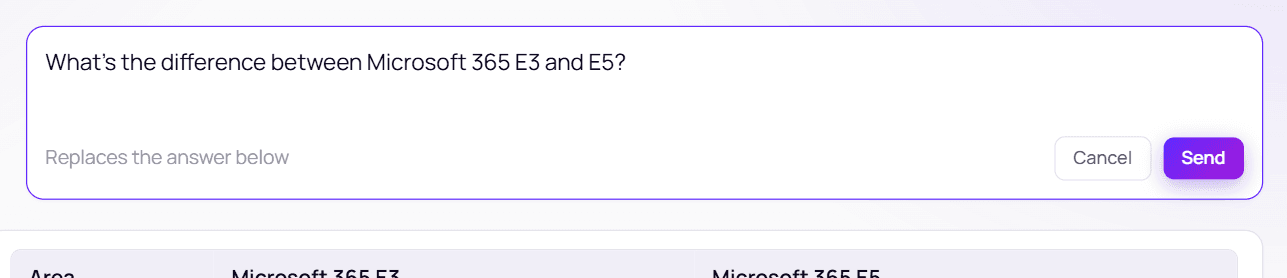
Editing rewrites that question in place. The editor warns "Replaces the answer below": when you press Send, the answers after that point are replaced by Maya's answer to your new wording. Press Cancel or Esc to leave it unchanged. You can't edit while an answer is still coming in.
Reshape an answer
You don't need to re-ask to change how an answer looks. Just say:
- "Put that in a table"
- "Shorter" / "More detail on the CAL part"
- "In Dutch" (or any language)
Maya re-presents her previous answer without changing its facts.
Tips for better answers
Name the product and version
“Windows Server 2025 Standard” beats “Windows Server”.
Say which agreement
EA, MCA-E, CSP and MPSA have different rules.
One topic per question
Maya handles multi-part questions, but a focused one is easier to verify.
Follow up in the same chat
Maya remembers the conversation — “and for 400 users?” works.
If your question is too open — for example "what should I buy?" — Maya will ask you one clarifying question first.